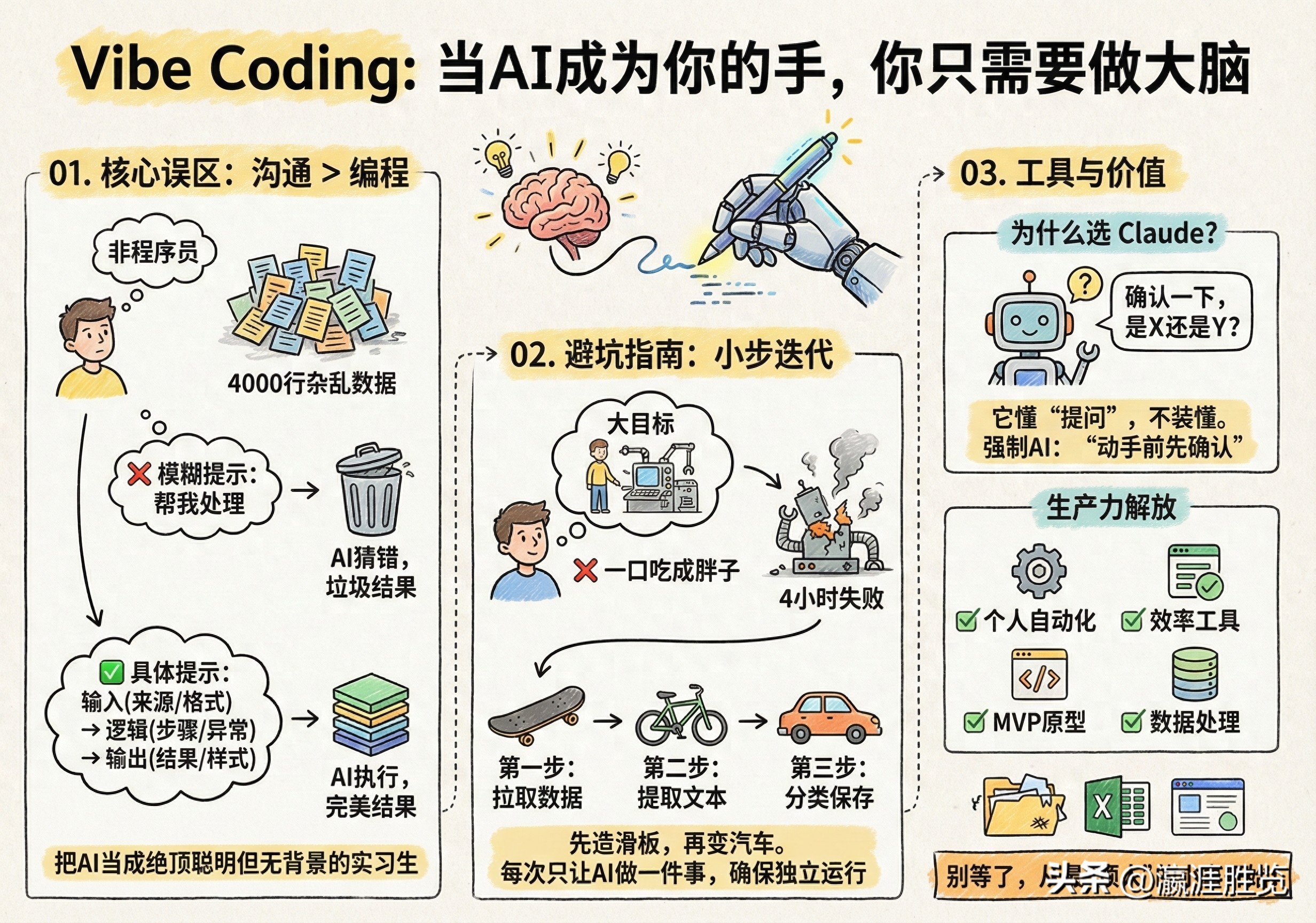
A few days ago, a story shared by AI researcher Elena went viral in the tech community.
Despite reading papers and testing models daily, she had never written a line of code. One day, she faced a tough problem: 4000 lines of messy data needed cleaning. Manual processing would take at least 6 hours.
She decided to give it a try and described her needs to Claude in natural language. 45 seconds later, she received a Python script. Running it was a success. Six hours of work was compressed into just one minute.
The key point is that she didn’t understand the code at all, but it worked.
This is the essence of Vibe Coding: You don’t need to learn Python or JavaScript; you just need to learn how to clearly express your intentions.
01. Core Misunderstanding: Vibe Coding is About Communication, Not Programming
Most people fail when trying to use AI to write code because they fall into a trap: thinking AI is a god that can read your mind.
Consider the difference between these two prompts:
- ❌ Vague version: “Help me create an email tool.”
- ✅ Specific version: “Write a Python script that reads a CSV file. First, check if each row’s email format is correct; second, remove duplicate emails; third, output a new CSV file containing only valid and unique emails; finally, print a summary of ’total processed, invalid count, duplicate count.'”
In the first prompt, AI can only guess. It’s likely to guess wrong and give you a bunch of useless junk.
In the second prompt, AI doesn’t need to guess. It just needs to execute.
The first principle of Vibe Coding: Treat AI as a brilliant intern who knows nothing about your background.
You wouldn’t say to an intern, “Get that done,” you would tell them:
- What the input is (data source, format).
- What the logic is (what to do first, what to do next, how to handle exceptions).
- What the output is (where the results are stored, what they look like).
You don’t need to understand technical jargon, but you need to write it out clearly like a handover document.
02. Avoiding Pitfalls: Don’t Try to Eat the Whole Cake at Once
Elena shared her most painful failure. She wanted to create a “Twitter bookmark analyzer” with comprehensive features: fetching, analyzing, categorizing, and generating weekly reports.
The first time, she simply told AI, “Help me make this analyzer.”
What was the result? A disaster. AI threw a bunch of complex API calls, dependencies, and error messages at her. She struggled for 4 hours before giving up.
A week later, she changed her strategy: Micro-Steps.
- Step one: “Write a script that fetches the latest 100 bookmarks.” — 10 minutes, successful.
- Step two: “Extract the text from each bookmark.” — 10 minutes, successful.
- Step three: “Categorize by keywords.” — Successful.
- Step four: “Save as a JSON file.” — Successful.
In one hour, she accomplished what took her 4 hours before.
This aligns with the ultimate truth of software engineering: Don’t build the wheel before the car; first build a skateboard, then modify it into a bicycle, and finally into a car.
The secret of Vibe Coding is to let AI do one thing at a time, ensuring that it can run independently. As long as it runs, you get positive feedback and can continue stacking blocks.
03. Why Choose Claude? Because It Understands “Questions”
Elena tried all mainstream AIs (ChatGPT, Cursor, Copilot) and ultimately chose Claude. Not because its code quality is always the best, but because it doesn’t pretend to understand everything.
- ChatGPT style: You give a vague instruction, and it confidently generates an answer. By the time you realize it’s wrong, you’ve wasted half an hour.
- Claude style: It pauses to ask you: “Just to confirm, do you want X or Y?” “I assume you need Z, right?”
For those who don’t understand code, these clarifying questions are lifesavers. They save you countless hours of debugging the wrong direction.
Advanced tip: Regardless of which AI you use, you can force it to be “more like Claude” by adding to your prompts:
“If anything is unclear, please confirm with me before proceeding.” “Before writing code, first describe your thoughts in natural language.”
04. Just Small Tools? No, This is a Liberation of Productivity
In six months, Elena, with no prior experience, built:
- A script to automatically organize bookmarks (saving 30 minutes daily)
- A bot to monitor posts from specific influencers
- A PDF batch summarizer (a researcher’s tool)
- A competitor price monitor
- A web data scraping tool
A year ago, each of these needs would have cost hundreds or thousands of dollars to outsource or negotiate on Upwork. Now? One afternoon, a cup of coffee, and she handled it herself.
This is the value boundary of Vibe Coding:
- It’s not suitable for: Core systems in finance and healthcare, large applications with thousands of concurrent users, or projects involving high security and privacy.
- It’s highly suitable for: Personal automation, internal efficiency tools, MVP prototype validation, and data processing scripts.
For these 80% of long-tail needs, you no longer need a computer science degree; you just need a clear mind and a bit of patience.
05. Don’t Wait, Start with the “Annoying” Tasks
If you feel the urge to start coding, don’t think about creating a world-changing app.
Find something annoying, repetitive, or frustrating in your daily life.
- Is it a messy downloads folder?
- Is it an Excel sheet that needs to be manually merged every month?
- Is it several websites you check daily?
Open AI and describe your needs as if you’re teaching a smart person.
Did it throw an error the first time? Don’t panic. Send the error message back and ask, “What’s going on? I expected A, but got B.”
The gap between “I have an idea” and “I made it happen” has never been narrower than it is today.
Stop envying programmers and start commanding AI.
Comments
Discussion is powered by Giscus (GitHub Discussions). Add
repo,repoID,category, andcategoryIDunder[params.comments.giscus]inhugo.tomlusing the values from the Giscus setup tool.